
🔥 Table of Contents
- Introduction to HashMap
- Why Do We Need HashMap
- Internal Working of HashMap
- Java 8 Enhancements in HashMap
- Practical Implementation in Java
- Summary
- Interview Questions
Introduction to HashMap
HashMap is one of the most commonly used data structures in Java from the java.util package.
👉 It stores data in key-value pairs
👉 It allows null key (only one) and multiple null values
👉 It is NOT thread-safe
👉 It provides constant time performance O(1) for basic operations (get/put)
Example:
import java.util.HashMap;

public class Example {
    public static void main(String[] args) {
        HashMap<Integer, String> map = new HashMap<>();

        map.put(1, "Java");
        map.put(2, "Python");
        map.put(3, "C++");

        System.out.println(map.get(2)); // Python
    }
}
Why Do We Need HashMap
Imagine you need:
👉 Fast lookup by key
👉 Unique keys
👉 Efficient insertions
HashMap solves all of these efficiently.
Without HashMap:
- Searching in a list → O(n)
With HashMap:
- Searching → O(1) average case ✅
💡 Real-world usage:
- Caching
- Database indexing
- Counting frequency of elements
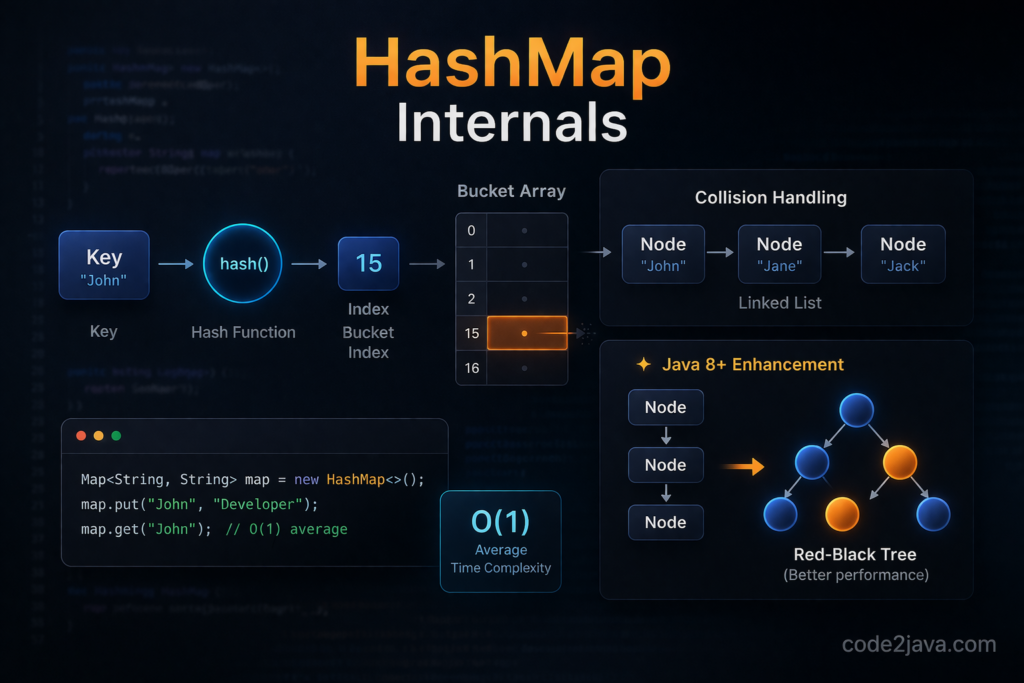
Internal Working of HashMap
Let’s break this down step by step.
Hashing Mechanism
👉 When you insert a key:
map.put("apple", 10);Java does:
👉 Calls hashCode() on key
👉 Converts it into a hash
👉 Maps it to an index in array
Formula:
👉 index = hash & (n – 1)
Where n = capacity of array
Internal Data Structure
HashMap internally uses:
👉 Array of Nodes (buckets)
Each bucket contains:
static class Node<K,V> {
    final int hash;
    final K key;
    V value;
    Node<K,V> next;
}👉 Each bucket acts like a LinkedList (before Java 8)
Collision Handling
🔥 Collision happens when:
Two keys produce same index
Example:
map.put("FB", 1);
map.put("Ea", 2);These two strings produce same hashCode!
👉 Then they are stored in same bucket using LinkedList
Structure:
Bucket → [Node1] → [Node2] → [Node3]
⚠️ Problem:
Too many collisions → performance becomes O(n)
Retrieval Process
map.get("apple");Steps:
👉 Calculate hash
👉 Find bucket index
👉 Traverse linked list
👉 Compare keys using equals()
👉 Return value if match found
Resizing and Rehashing
🔥 Default capacity = 16
🔥 Load factor = 0.75
When size exceeds:
👉 capacity * loadFactor (16 * 0.75 = 12)
Then:
👉 Array size doubles (16 → 32)
👉 All entries are rehashed
⚠️ Rehashing is expensive operation
Java 8 Enhancements in HashMap
Java 8 brought a major optimization 🔥
Treeification (LinkedList → Red-Black Tree)
When number of nodes in a bucket exceeds 8:
👉 LinkedList → Red-Black Tree
Condition:
👉 bucket size ≥ 8 AND capacity ≥ 64
Performance Improvement
👉 LinkedList search = O(n)
👉 Tree search = O(log n) ✅
This significantly improves worst-case performance.
Untreeification
If nodes drop below 6:
👉 Tree → LinkedList again
Improved Hashing Technique
Java 8 improves hash distribution:
hash = key.hashCode() ^ (hash >>> 16);👉 This reduces collisions
Practical Implementation in Java
Let’s simulate collision and understand behavior.
import java.util.HashMap;

class Key {
    String value;

    Key(String value) {
        this.value = value;
    }

    @Override
    public int hashCode() {
        return 1; // Force collision
    }

    @Override
    public boolean equals(Object obj) {
        return this.value.equals(((Key) obj).value);
    }
}

public class HashMapInternalDemo {
    public static void main(String[] args) {
        HashMap<Key, String> map = new HashMap<>();

        map.put(new Key("A"), "Apple");
        map.put(new Key("B"), "Ball");
        map.put(new Key("C"), "Cat");

        System.out.println(map);
    }
}
👉 All keys go into same bucket due to same hashCode
💡 This helps visualize collision handling
Important Internal Methods
Some key internal methods:
👉 putVal() → handles insertion
👉 resize() → handles rehashing
👉 treeifyBin() → converts list to tree
👉 getNode() → retrieves value
Summary
✅ HashMap uses array + hashing
✅ Collisions handled using LinkedList (Java 7)
✅ Java 8 uses Red-Black Tree for optimization
✅ Average complexity → O(1)
✅ Worst case improved from O(n) → O(log n)
💡 Key takeaway:
Good hashCode() implementation is critical for performance
Interview Questions
- What is HashMap and how does it work internally?
👉 It uses hashing and array of buckets to store key-value pairs. - What is collision in HashMap?
👉 When multiple keys map to same bucket index. - How does Java 8 improve HashMap performance?
👉 Converts LinkedList into Red-Black Tree after threshold. - What is load factor?
👉 It defines when resizing should happen (default 0.75). - Why hashCode() and equals() both are required?
👉 hashCode() finds bucket, equals() finds exact key. - What is treeification threshold?
👉 8 nodes in a bucket. - Is HashMap thread-safe?
👉 No. - What happens during rehashing?
👉 Capacity doubles and all entries are redistributed.